

How to Use ChatGPT Voice Conversation for Hands-Free AI Assistance
ChatGPT Voice Conversation Feature reduces typing and reading effort. It makes AI conversations faster and more convenient.

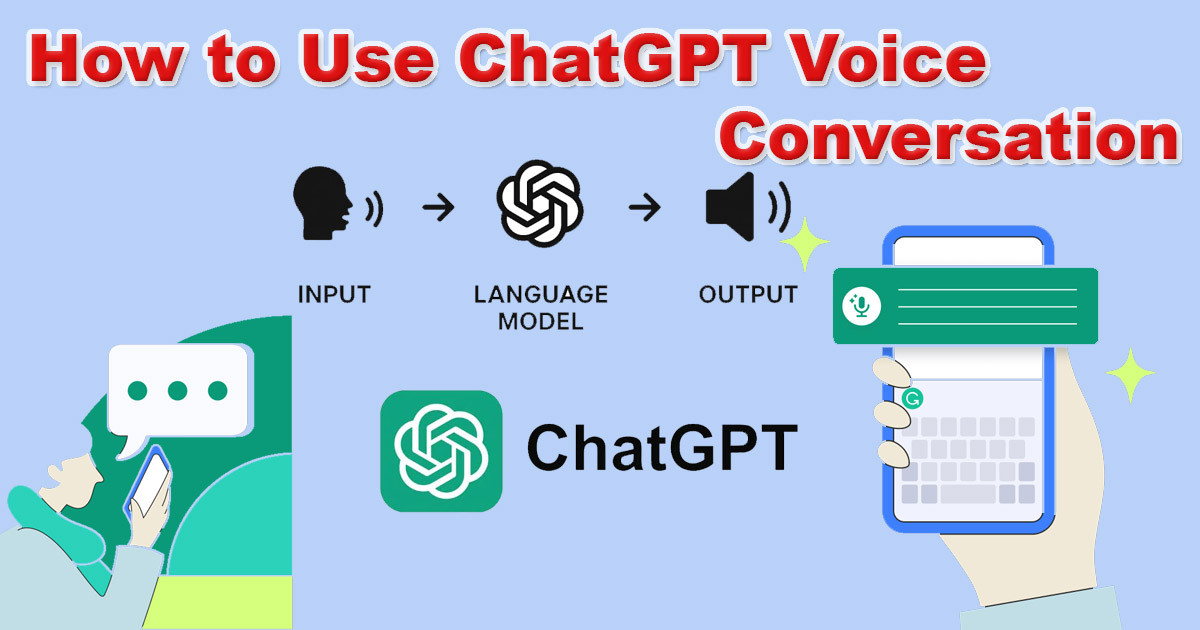
How to Use ChatGPT Voice Conversation for Hands-Free AI Assistance
You have a busy life. Your hands are often tied up with cooking, driving, or handling tools, but your mind is still working on projects. Typing on a small smartphone screen is slow and frustrating when you have better things to do. You want help, but you cannot stop what you are doing to stare at a screen. Learning how to use ChatGPT voice conversation for hands-free AI assistance is the best way to bridge this gap.
ChatGPT voice conversation changes how you interact with AI. It moves beyond simple text prompts to a back-and-forth dialogue. This makes it a great partner for your daily tasks, whether you are trying to be more productive or just need some extra help with your day-to-day life.
By reading this guide, you will learn how to turn on this feature, master the art of talking to your phone, and make the most of this technology. You will see how it goes from a cool trick to a solid tool in your daily routine.
Understanding ChatGPT Voice Conversation
Many people think of AI as something that happens in a chat box. That is only half the story. When you use voice chat, you unlock a completely different way to work with AI. It is about speed and convenience.
What is ChatGPT Voice Conversation?
ChatGPT voice conversation is a mode that lets you talk to the AI using your natural voice. Instead of tapping on a keyboard, you just speak. The AI listens to your words, thinks about them, and talks back to you in a human-like voice. Its purpose is to make interaction feel natural and immediate, like talking to a friend or an assistant standing right next to you.
The Technology Behind the Voice
You might wonder how it works so well. It uses a combination of two technologies. First, it uses Automatic Speech Recognition, known as ASR, to turn your spoken words into text that it can read. After it generates a reply, it uses Text-to-Speech, or TTS, to turn that text back into the spoken audio you hear. These systems are fast enough that you don't have to wait long for a response, making the conversation feel fluid and easy.
Comparing ChatGPT Voice to Traditional Voice Assistants
We are used to assistants like Siri or Alexa. They are great for turning off lights or setting a timer. However, ChatGPT is different. While those assistants often struggle with complex questions, ChatGPT is built to understand context and reason. It can brainstorm ideas, write stories, or explain tough topics in a conversational way. It is less like a remote control and more like a smart partner who can actually talk through problems with you.
Getting Started with ChatGPT Voice
Setting up this feature does not take long. Once you have the basics down, you can start using it anywhere.
System Requirements and Device Compatibility
First, you need the official ChatGPT app on your smartphone. It works on both iOS and Android. Ensure your app is updated to the latest version, as this feature is improved frequently. You also need a reliable internet connection. If your signal is weak, the conversation will lag or drop out, which ruins the experience. Finally, make sure you have granted the app permission to access your phone's microphone.
Enabling Voice Conversation in the ChatGPT App
Open the ChatGPT app on your phone. Look at the bottom right corner of the screen for the small headphone icon. If you do not see it, you may need to update your app. Tap the icon, and the app will enter voice mode. You will see a circular animation that shows the AI is listening. You are now ready to speak.
Your First Voice Interaction: A Simple Walkthrough
When you first tap the icon, the app might ask for permission to use your microphone. Say "yes." Once you see the moving circles, just start talking. You can say something simple like, "Hi, can you help me brainstorm some healthy dinner ideas?" The AI will process what you said and respond immediately. Listen to its answer, and when it finishes, it will wait for your reply. It is that simple.
Mastering Hands-Free Interaction: Advanced Techniques
Now that you know the basics, let’s get better at using it. You want to talk in a way that helps the AI give you the best answers.
Optimizing Voice Commands for Clarity and Accuracy
You do not need to shout. Speak in your normal, conversational voice. If you are in a loud place, hold the phone closer to your mouth. Try to speak clearly and avoid running your words together. If your request is complicated, break it into smaller parts. Instead of asking for a long list of things at once, ask for the first part, get the answer, and then ask for the next part.
Leveraging Voice for Productivity Tasks
Many pros see ChatGPT as a flexible productivity tool because it helps them get work done while moving. Use it to draft emails or brainstorm blog post ideas while you are driving or walking. You can dictate a rough list of tasks and ask the AI to organize them into a schedule for you. It is also perfect for summarizing long reports; just read the main points and ask the AI to break down the key takeaways.
Creative Applications of ChatGPT Voice
Do not just use it for work. You can use your voice for fun, too. Use it to practice a new language by having a conversation. You can ask it to tell you a bedtime story or help you write song lyrics on the fly. You can even set up a role-play scenario where the AI pretends to be a famous historical figure or a hiring manager, and you practice your conversation skills.
Real-World Use Cases and Benefits
Voice interaction is not just a gimmick. For many, it is a big help.
Hands-Free Multitasking: For Professionals on the Go
Think about someone who spends their day in the car. They can ask ChatGPT to look up information or draft a response to a client without touching their phone. Field technicians or workers in manual jobs can get instant answers to technical problems without needing to put down their tools. This keeps their hands free for the job and their eyes on the task.
Enhancing Accessibility and Inclusivity
Voice is a big win for accessibility. For people with visual impairments, or for anyone who struggles with touchscreens, voice interaction opens the door to using AI. It removes the barrier of having to see and tap small buttons. It makes the power of AI available to a wider group of people in a way that feels natural.
Personal Convenience and Entertainment
On a personal level, it makes life smoother. Need to know the ingredients for a recipe while your hands are covered in flour? Just ask. Need to settle a debate about a movie fact while you are cleaning the kitchen? Ask the AI. It can even just be a pleasant way to learn about a new topic while you are taking a walk outside.
Tips for Seamless and Efficient Voice Usage
To keep your experience smooth, keep these few things in mind.
Maintaining a Stable Internet Connection
A fast, stable connection is key. If you are using mobile data, make sure you are in an area with good service. If your connection flickers, the app will struggle to hear you or send the response. If you are traveling, a stable Wi-Fi connection is always better.
Understanding and Managing Response Length
Sometimes, the AI might talk too much. If you want a quick answer, tell it. You can say, "Keep your answer to one or two sentences." If you want a deep dive, say, "Explain this in detail." You can control the length of the response just by asking.
Personalizing Your AI Interaction
The more you talk to it, the better it gets at knowing what you like. If you prefer a friendly, casual tone, tell it that. If you want it to be direct and to the point, tell it that too. It will remember these preferences for your future conversations, making each talk feel more like it was built just for you.
Conclusion: The Future of Conversational AI is Here
ChatGPT voice conversation is a real step forward. It is not about talking to a machine in a robotic way, but having a helpful, smart conversation that fits into your actual life. Whether you are working, creating, or just trying to get through a busy day, this feature is a great way to get more done without being tied to a screen.
The best way to see the value is to try it yourself. Next time you are driving, doing chores, or just have a few minutes while walking, tap that headphone icon and start a conversation. You will quickly find that it is an easy way to bring a smarter assistant into your day.
What's Your Reaction?
 Like
0
Like
0
 Dislike
0
Dislike
0
 Love
0
Love
0
 Funny
0
Funny
0
 Wow
0
Wow
0
 Sad
0
Sad
0
 Angry
0
Angry
0









Comments (0)