

Instagram comments can now be edited (within 15 minutes)
Meta is giving users the ability to edit Instagram comments they leave on posts, though only within a 15 minute window after they're posted.

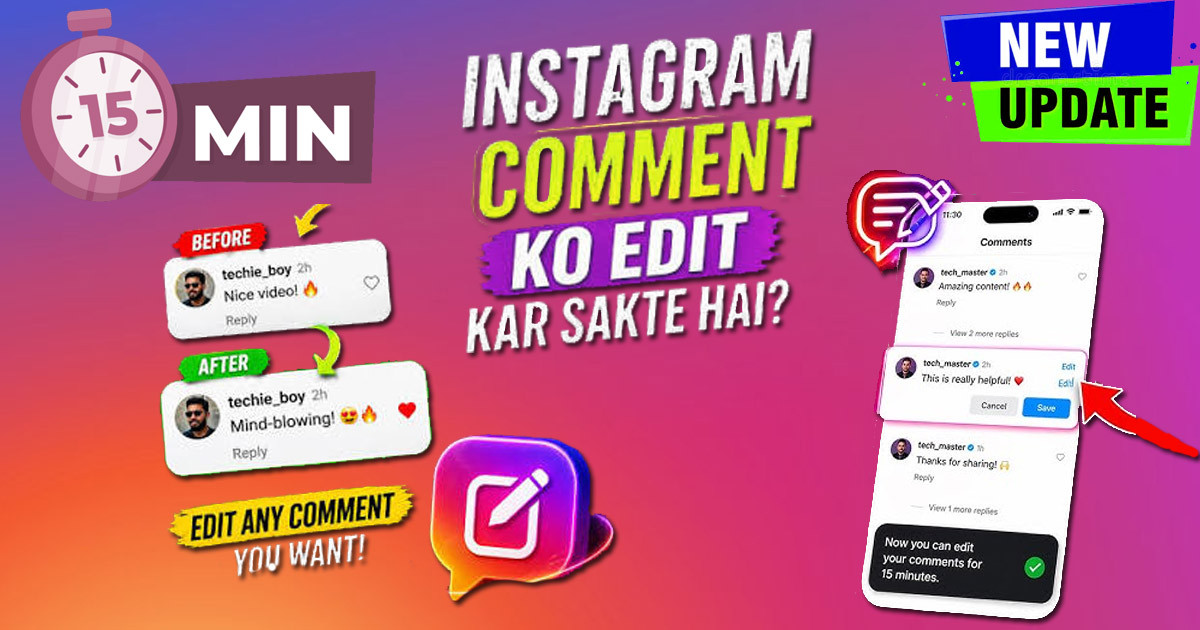
Fix Typo Fails: Instagram Comments Can Now Be Edited (Within 15 Minutes)
We have all been there. You hit send on an Instagram comment, only to spot a glaring typo or the wrong word choice the very second it goes live. For years, your only option was to delete the entire comment and start over. That meant losing any likes or replies already attached to your message. Now, things are different. Instagram comments can now be edited, giving you a 15-minute window to fix mistakes without losing your conversation thread.
This new tool is a big deal for anyone who spends time on the platform. Whether you use your account to connect with friends, grow a creator presence, or manage a business, this update changes how you handle mistakes online. This guide covers how this feature works, why it matters, and how to use it to keep your interactions clean and clear.
How to Edit Your Instagram Comments: A Step-by-Step Guide
The process of changing your comment is straightforward. Instagram designed it to be quick, so you can correct your mistake before anyone notices.
To edit a comment, follow these steps:
- Find your comment: Scroll to the post where you left the comment.
- Long-press or tap: On your comment, tap and hold (on iOS) or tap the three-dot menu (on Android) to open the options.
- Select Edit: You will see an "Edit" option appear. Tap it.
- Make your changes: The comment text box opens again. Type your correction or change the phrasing.
- Save: Once you are happy with the edit, tap the checkmark or the "Done" button to save the changes.
There is a strict 15-minute time limit for this action. Once that timer runs out, the edit option disappears, and your comment is locked in its current form. You must act fast if you want to fix a mistake.
When you edit a comment, it does not disappear and reappear as a new post. The same comment box remains. However, others will see an "Edited" tag next to your comment. This tag makes it clear that the text was modified. It keeps things honest and prevents people from changing the meaning of a comment completely after someone else has already replied to it.
Why Instagram Introduced Comment Editing
For a long time, the inability to edit comments was a major pain point for users. It made simple typos feel permanent and created unnecessary friction. By introducing this edit feature, Instagram directly addressed a long-standing request from its community.
The main reason for this change is improving communication accuracy. Typos can change the meaning of a sentence, or they can simply make a comment look messy. With the ability to edit, you can clean up these errors instantly. This prevents misunderstandings and ensures that your actual message is what the reader sees.
This move also brings Instagram in line with other social platforms. Many other apps, like Facebook and various messaging services, have offered comment or message editing for years. As users move between these platforms, they expect a similar level of control over their words. Providing this option keeps the Instagram experience modern and user-friendly.
Maximizing the 15-Minute Editing Window: Proactive Strategies
Even with this 15-minute window, it is still better to get it right the first time. Relying on edits can become a habit, which might look sloppy if you do it too often.
Here are a few ways to be more proactive with your comments:
- Take a breath: Before hitting the send button, take two seconds to read your comment one last time. Scanning for obvious typos or weird autocorrect changes can save you from needing that edit later.
- Keep it short: Shorter, simpler sentences are harder to mess up. If you are writing a long, complex thought, consider breaking it into smaller parts or re-reading it carefully before posting.
- Use the edit for good: Use this feature for real errors—fixing a typo, adding a forgotten hashtag, or correcting a factual mistake. Do not feel the need to use it to "perfect" your tone repeatedly.
If you know you tend to make mistakes, try a simple mental trick. After you write your comment, look away from your screen for a second, then look back. A fresh set of eyes often spots errors that you missed while typing. If you still find yourself making errors frequently, slow down your typing speed.
The Impact of Edited Comments on Engagement and Brand Perception
For brands and creators, how they communicate impacts their reputation. An error-free comment section looks professional and shows attention to detail.
Using the edit feature helps businesses maintain a clean public image. If a community manager accidentally posts the wrong link or a typo, they can fix it before it causes confusion among followers. This quick correction protects the brand’s professional look without requiring a comment deletion that might look suspicious to others.
However, there is a balance between being professional and being authentic. If you edit every single comment, it might look like you are trying too hard to be "perfect." Instagram users often value authenticity. A minor typo here and there can actually make you seem more human and relatable. Do not feel that every comment needs to be polished like a press release.
Finally, consider the moderation side. While the edit feature is great, it also has potential for misuse. Some people might use it to change their original comment after receiving backlash, trying to hide what they really said. Because of the "Edited" label, followers will know that a change happened, which acts as a form of transparency. Instagram likely monitors how this feature is used to ensure it is not being abused for harassment or spreading misinformation.
Beyond the Edit: Best Practices for Instagram Comments
The edit tool is a safety net, not a replacement for thoughtful engagement. Your goal should still be to write meaningful and helpful comments that add value to the post.
When crafting a comment, think about what you want to achieve. Are you starting a discussion, sharing your thoughts, or just showing support? Being specific and personal is always better than generic phrases. A genuine comment builds a stronger connection with the creator and the community.
If you receive a comment that requires a nuanced response, take your time. Do not feel rushed to reply immediately just because the platform is fast. Sometimes, a well-thought-out reply is worth more than a quick one. If you have to correct something in your own reply, use the edit feature, but remember that the best interactions happen when you take the time to get it right.
Lastly, keep in mind that your comment visibility depends on privacy settings and the algorithms. Your comment might be at the top if it gets lots of likes, or it might be hidden if it is flagged. The edit feature does not change how Instagram displays your comments; it only changes the text within them.
Embracing the Evolving Instagram Comment Landscape
The addition of a 15-minute editing window for Instagram comments is a welcome change. It gives you a simple safety net to fix mistakes and communicate more clearly. By understanding how the feature works and using it responsibly, you can maintain a cleaner, more professional, and more authentic presence on the app.
Remember that editing is a tool, not a crutch. Use it to fix errors, not to obsess over perfection. Thoughtful, clear communication remains the most important part of interacting on Instagram. Now that you have this new ability, you can participate in conversations with a little more peace of mind, knowing that your typos do not have to be permanent. Take advantage of the 15-minute window to keep your digital interactions sharp and accurate.
What's Your Reaction?
 Like
0
Like
0
 Dislike
0
Dislike
0
 Love
0
Love
0
 Funny
0
Funny
0
 Wow
0
Wow
0
 Sad
0
Sad
0
 Angry
0
Angry
0














Comments (0)